
EZ Sheet Overlay
Align PDF drawings in Navisworks
Place the issued drawing on a model surface and compare the PDF with the 3D geometry. Share the placement and original PDF together in a saved NWF or published NWD.
Practical guides for using this plug-inRevit and Navisworks plug-ins with one installer and one account. Subscribe to one, a bundle or all of them.
Compare a floor plan with a model section
Use two visible grid intersections to register a PDF floor plan to the federation.
Before you start
- Navisworks Manage 2026.3 or later in the 2026 series, or 2027.
- A PDF with two recognizable points and a 3D model.
- An EZ-VDC account with eligible trial or active access.
- 1.
Choose the section
Add the local PDF, choose the page and select the model surface that defines the section plane.
- 2.
Match the drawing and the model
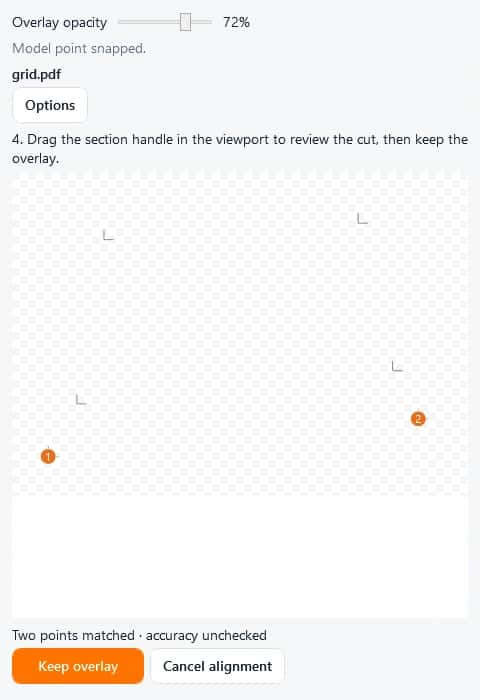
Pick two widely spaced intersections on the PDF, then pick the same two points in the model in the same order.
- 3.
Review the cut
Move the section with its viewport handle and adjust overlay opacity. Check a third point before keeping the overlay.
- 4.
Save or publish
Save overlays in the NWF or publish a separate NWD with embedded overlays for review.
How to check the result
- Compare a third point away from the two alignment picks.
- Reopen the saved or published file and confirm the PDF and placement.
Scope and limits: Recipients need EZ Sheet Overlay. An NWF also needs its referenced model files. Automatic placement requires a registered Revit sheet and the matching NWC.
Questions about this workflow
Can I use a local PDF?
Yes. Add a local PDF and align it with two point pairs. Forma Docs is optional.
Can I use a PDF from Forma Docs?
Yes. Use the shared Autodesk connection with the required account integration and project permissions, then select a PDF revision.
What is included in the subscription?
The $10 USD monthly plan includes the Navisworks overlay and the Revit exporter. Both tools are also included in Navisworks Pack and All Access.
Navisworks Manage 2026.3+ and 2027
Revit exporter for 2026.5+ and 2027
Interface preview · Interface preview
Interface preview · Interface preview
What it adds to this workflow
Need something custom?
We build custom Navisworks and Revit plug-ins for your workflow.
Request Development