
EZ Issue Viewer
Review ACC issues in their Navisworks model context
Bring issue location, responsibility, discussion and status into the model review. EZ Issue Viewer connects to an ACC project and is included with EZ Clash Manager.
Practical guides for using this plug-inRevit and Navisworks plug-ins with one installer and one account. Subscribe to one, a bundle or all of them.
Worked example: review one assigned ACC issue
Start with an existing issue in a project you can access. Review one item before making changes across a larger coordination scope.
Before you start
- Navisworks 2026 or 2027 with EZ Clash Manager installed and available.
- An Autodesk account with access to the intended ACC project; editing requires the appropriate permissions.
- The relevant model and an existing issue whose location or linked clash you can check.
- 1.
Connect to the intended project
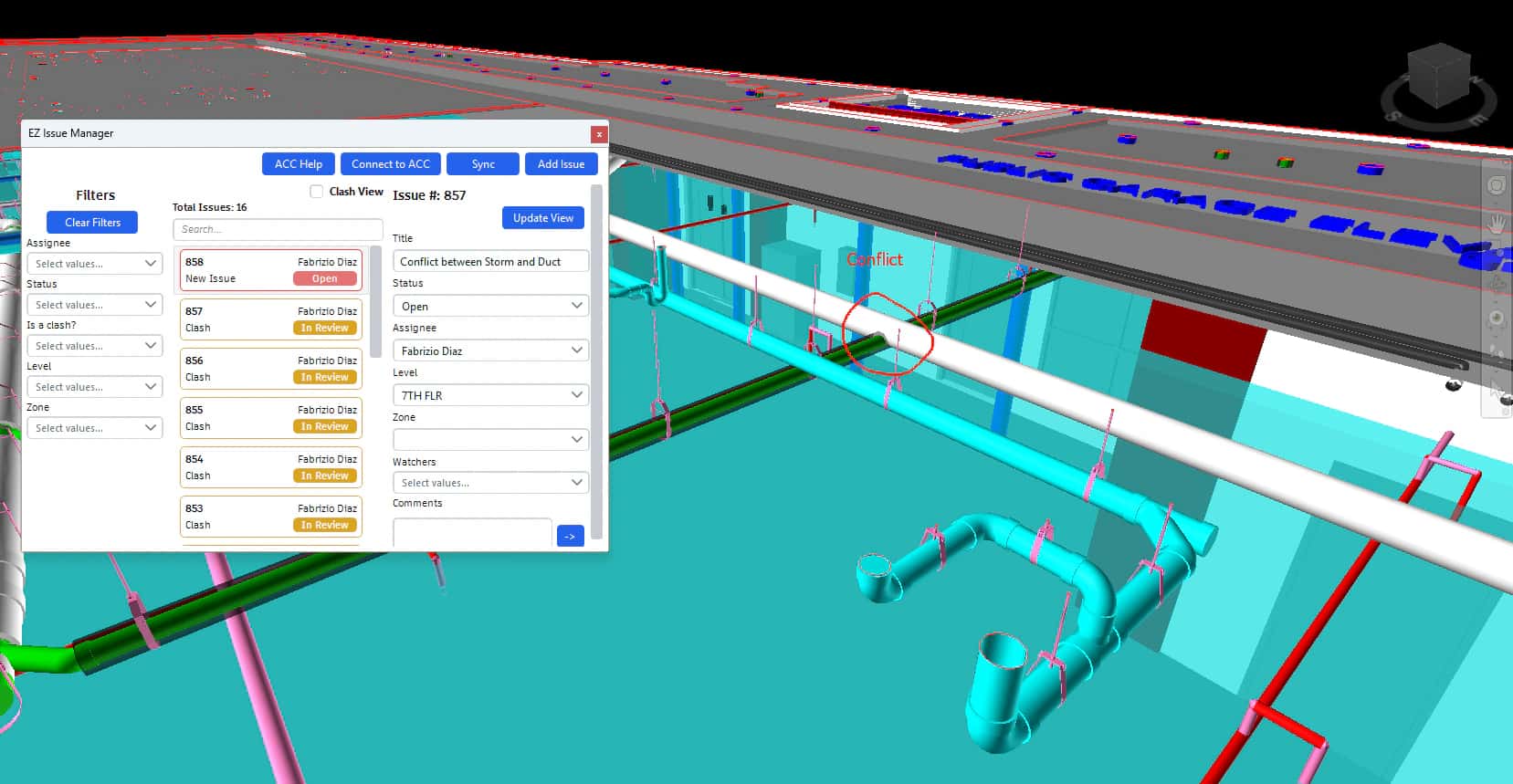
Connect or refresh the issue list. Confirm the ACC project and filter by assignee, status or location so the review covers the intended items.
- 2.
Inspect the issue in the model
Select one issue and inspect its saved view or pin. Use Go to clash when a clash link exists. Check the camera, model placement and issue description together.
- 3.
Make the intended permitted edit
If an update is needed, choose an available status or assignee and add the relevant explanation or evidence. Check the operation result; a local edit alone does not confirm a cloud update.
- 4.
Refresh and verify
Refresh the issue and compare its status, assignee and discussion with ACC. When synchronizing linked clashes, inspect the resulting clash status and report before continuing.
How to check the result
- Confirm the project, issue identifier and intended assignee.
- Compare the pin or saved view with the actual geometry.
- Verify the refreshed cloud values and any synchronization notes.
Scope and limits: Cloud writes depend on ACC permissions and available status metadata. Some issues lack a resolved model pin or clash link. Refresh and verify changes rather than assuming continuous background synchronization.
Questions about this workflow
Do I need ACC access?
Yes. Issue Viewer reads issues from the ACC project you connect to. The account’s project permissions determine which operations are available.
Must every issue be linked to a clash?
No. The workflow also supports model issues without a Clash Detective result. Go to clash applies only when a link exists.
Are all issue statuses editable?
No. The available choices depend on project metadata, the current issue and the user’s permissions. Check the result in ACC after an edit.
ACC Integration
Clash-Issue Linking
Advanced Filtering
Issue Viewer controls
Issues in model context
What it adds to this workflow
Need something custom?
We build custom Navisworks and Revit plug-ins for your workflow.
Request Development