Custom Revit & Navisworks Automation
Automate a defined BIM workflow with agreed rules, representative inputs, supported host versions and clear acceptance checks.
Automate a defined Revit or Navisworks workflow: model queries, repetitive view and sheet setup, coordination data processing, or review and reporting. We begin with representative files and the current manual sequence, agree what the tool may change, and define acceptance examples before development. Supported Autodesk versions, deployment, source ownership and maintenance are written into the proposal. Existing EZ-VDC products provide workflow references; they are separate from a bespoke client engagement.
Define the workflow
Provide representative inputs, current steps, exceptions and desired outputs. Separate user decisions from rules the software can apply.
Review a prototype
Confirm selection, preview, errors and the change boundary with the people who will use the tool.
Build and validate
Check agreed examples and edge cases in each supported Autodesk host version. A standalone build does not replace a host test.
Deploy and hand over
Deliver the agreed package, installation instructions and validation record. Define support and version-update responsibilities.
What we need to scope your project
Share the project stage, disciplines, required deliverables, and target dates. Tell us which drawings, models, BIM Execution Plan, or information requirements are available.
We agree on formats, information requirements, responsibilities, review cycles, and acceptance criteria before kickoff. Deliverables follow the agreed scope.
Discuss your projectGuides for planning your project
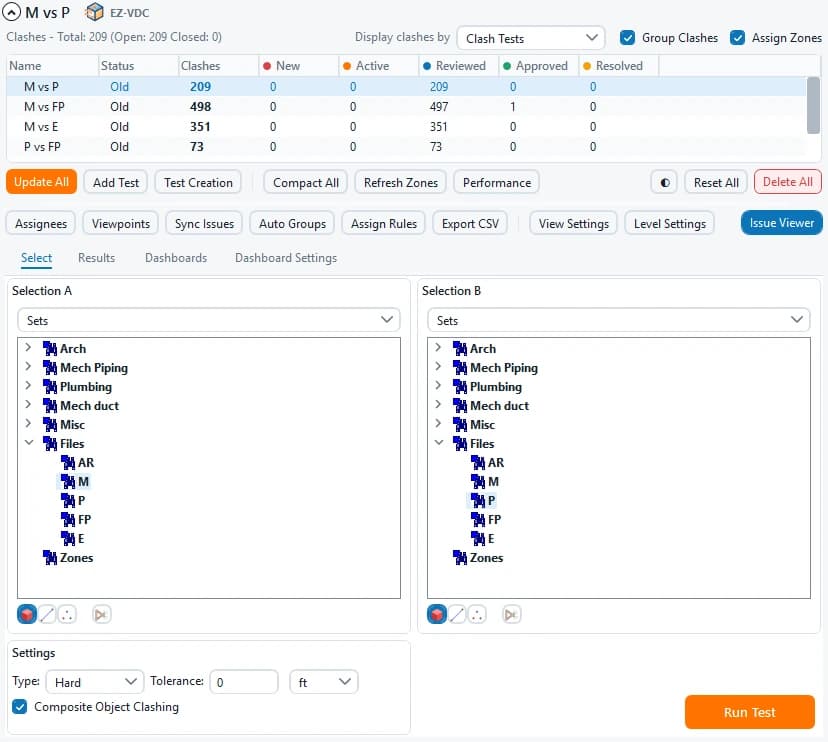
Workflow reference: EZ Clash Manager
The existing product supports test selection, results review and report preparation inside Navisworks. The capture shows its published interface. This is a product reference, rather than a bespoke client case or a claimed saving.
 Review product and tutorials
Editable worksheets for scoping the work
Blank Markdown templates: open them in any text editor. They contain no client data and do not represent project results.
How to compare proposals